|
<< Click to Display Table of Contents >> TRACE |
  
|
|
<< Click to Display Table of Contents >> TRACE |
|
TRACE opens the so-called trace viewer to show data-traces of a timeseries. The trace viewer can alternatively be started from the DISP command (when clicking a trace link).
Data-tracing is the ability to trace timeseries operations backwards in time, also known as data lineage. If you consider some output series z, produced from a series operation f(y) on an input series y, we may think of data-tracing as the ability to store (in metadata) how z was produced. Hence, the operation z = f(y) is stored in z. And if y depends upon some other series x (for instance the operation y = g(x)), this information is also stored inside z (and in y, too). Besides "recording" Gekko code like for instance z = y/4; or collapse y = x!q total;, data-tracing also stores information regarding which file and line the statement occurred in, time period, time stamp, etc. Therefore, in principle, an error in some observation in z can be traced back to y and x, just by looking at the z data-traces (and without looking into any .gcm programs).
NOTE: When running the same series statements again and again iteratively (for instance, iterating over rows and columns in an input-output table until convergence), you may consider switching off data-tracing with option databank trace = no;. For such solver-like scenarios, data-tracing may slow down the calculations needlessly. |
trace series ;
series |
A Gekko series or array-series. |
•If a variable is stated without databank, the databank is assumed to be the first-position databank.
Consider this trace.gcm program file:
reset; |
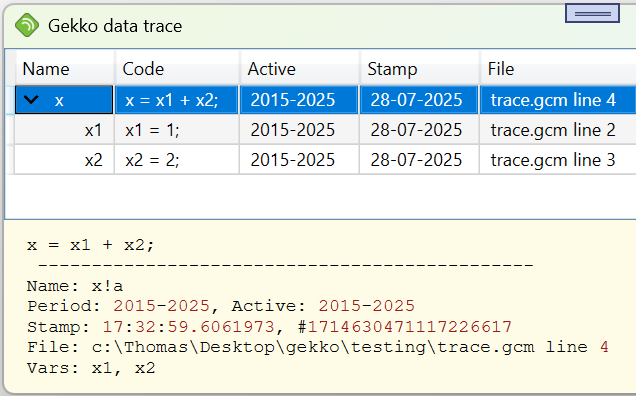
In the data-trace viewer, you may click the ">" symbol to the left of x to unfold the x1 and x2 sub-traces. In the above example, when you print x, it will print as the value 3. Data-tracing can tell you that the value 3 originated from the statement x = x1 + x2, where x1 originated from x1 = 1 and x2 originated from x2 = 2 (x1 and x2 are "precedents" to x). This explains the value 3. In addition to this, the data-trace system can, among other things, also tell the user when x, x1 and x2 were computed, in which Gekko program file (and line), and over which time periods. The x data-traces regarding x1 and x2 are kept even if x1 and x2 are subsequently deleted (and x is not).
Data-tracing works in and out of databanks, so you may trace series statements through Gekko databanks (.gbk). In Gekko >= 3.1.16, Gekko tracing is switched on per default. To switch it off, you may use this option at the top of your Gekko program:
option databank trace = no; |
To turn off tracing for only a few statement lines, you may use the following BLOCK statement:
block databank trace = no; |
To turn tracing off for at a single statement, you may use this local option:
x1 <option databank trace = no> = 1; |
Data-tracing costs some cpu performance and makes Gekko databanks larger. The data-traces time consumption is reported as a percentage after each Gekko job. See this appendix for much more about this.
The following functions can be used together with data-traces:
Function name |
Description |
Examples |
||
fromTrace(x, type) |
Extracts trace information from a timeseries x as a list, with one list element for each data-trace (newest first). Type can be:
•'id'. ID's as strings. •'stamp2'. Stamps as Gekko daily dates. •'name'. Variable names (left-hand side) as strings. •'code'. Gekko statements as strings. •'period'. Periods as a nested list of dates. •'active'. Active periods as a nested list of date spans. •'file'. A list of file names and line numbers. •'datafile'. A list of datafiles used. •'vars'. A nested list of variable names used.
Note: only direct traces are returned, not nested traces. |
reset; time 2020 2025; |
||
traceBank(b, type) traceBank(x, b, type) |
After a databank containing traces is read/opened, the traceBank() function can find data connections between variables. Arguments are x for the Gekko (array-)timeseries, b is a string containing a databank name, and type is either 'precedents', 'precedents1' , 'dependents' or 'dependents1'. The x argument may be a string like 'x[a]!q' or a series object like x[a]!q. You may call the function without the x argument: in that case, all series names are considered.
Note: for 'dependents' type, it is recommended that x is a string name rather than a series object (because the series object may not even exist).
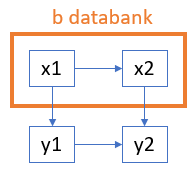
The options 'precedents1' and 'dependents1' limits the effects to direct effects only. For instance, in the example, y2 directly depends upon x1 from the b databank, but not directly upon x2.
Note: you may remove frequencies from the list elements with for instance tracebank('y2', 'b', 'precedents').removefreq(). |
open<edit>b; clear b; prt tracebank('y2', 'b', 'precedents1'); prt tracebank('x1', 'b', 'dependents1'); //'x1!a', 'x2!a' //'x2!a' //'y1!a', 'y2!a' //'y1!a'
//The series x1 and x2 reside in the b databank, //where x2 depends upon x1. The series y1 depends //upon b:x1, and the series y2 depends upon y1 //and b:x2. The first tracebank() call shows that //y2 depends upon both b:x1 and b:x2, the former //of these indirectly via x2. The third //tracebank() shows that b:x1 affects both y1 and //y2, the latter of these indirectly via both y1 //and b:x2. |
||
traceBanks(m) traceBanks(m, direct, freq) |
For a first-position Gekko-databank with data-traces, this function finds precedents (cf. the traceBank() function), and for each precedent, the function shows its dependents. The first argument is a list of databank names to look for in the data-traces, for instance the list ('b1', 'b2'). In that case, the function loops over 'b1' and 'b2', let us start out considering 'b1'. The function looks for all occurrences of b1: in the data-traces, and each occurrence gets a line in the output file tracebanks_b1.txt. Given series statements like y = b1:x1; z = 1/b1:x1; the output file could have a line like:
x1 y, z
meaning that x1 from the b1 databank is used, and it is used to determine y and z from the first-position Gekko databank.
You may set the second argument to 1 to get direct effects only, and the third argument to 1 to include frequencies, like x1!a. Cf. also prt tracebank('b1', 'precedents');, which will print names corresponding to the first column in tracebanks_b1.txt. |
traceBanks(('b1', 'b2')); |
||
traceDelete() traceDelete(x) |
Deletes all trace references in the first-position databank (or use x for an optional databank name). After this, a traceStats() will show 0 traces. |
tracedelete(); |
||
traceStats() traceStats(x) |
For now, this function is only a simple overview of the number of traces (x is an optional databank name). Depth = 0 means traces that are directly assigned to existing timeseries, whereas depth = n > 0 indicate traces that are not assigned to existing timeseries, but are instead assigned to other traces with depth = n-1. Traces with depth > 0 can be thought of as remnants of timeseries that do not (or do no longer) exist in the particular databank. |
tracestats(); |
Data-tracing has some similarities to decomposition of model equations. In both cases, data values are tracked backwards to their origins. It is planned for data-tracing to be able to send off a data-trace like for instance x = x1 + x2 to the DECOMP engine for further analysis.
When a new trace is about to be added to a series x, Gekko will first check if the last added trace is "practically identical" to the new one. If so, the new trace is omitted. "Practically identical" means that the code and the file + line number are the same, even though the entailed time period may differ. This avoids creating a web of trace dependencies in time-loops like the following x <2010 2020> = 100; for val %t = 2010 to 2020; x[%t] = x[%t] + 1; end;. Here (and in contrast to x = 100; x = x + 1;), x will get a trace corresponding to each year in the loop. But the 2020-trace will only point to the 2010-trace as a subtrace, not to the 2011-trace, the 2012-trace and so on.
Regarding data-trace stamps, Gekko >= 3.1.20 uses UTC time stamps, so different time zones are handled consistently.
option databank trace = yes;
option databank trace divide = no;
option databank trace dublets = no;
BLOCK, DECOMP, DISP, PRT, SERIES