|
<< Click to Display Table of Contents >> DISP |
  
|
|
<< Click to Display Table of Contents >> DISP |
|
The DISP statement is primarily used for printing series or array-series info. DISP has a close cousin PRT for printing too, but DISP can show more meta information like labels, dimensionality, data-traces, modeling info, etc. (on the contrary, DISP does not allow mathematical expressions). For an array-series x, DISP shows the dimensionality of x, including the elements of the different dimensions, domains, etc.
If a model is loaded, DISP shows modeling/equation information for the variable, for instance model precedents and dependents, etc. If a variable list is contained in a model .frm file (or as an external varlist.dat file), this information is shown in DISP, too. Provided a Gekko or GAMS model is loaded with MODEL, the DISP statement starts an equation browser, which means that variable names can be clicked, and that you may browse forwards and backwards by means of the arrow buttons in the user interface (the 'home' button will browse back to the first DISP). For GAMS models, there are special options regarding how to identify which variable a given equation determines.
When displaying timeseries, remember that default DISP only shows series of the currently active frequency from the first-position databank. You may use : and ! to broaden this, for instance disp *:*!*; displays all timeseries of all frequencies from all databanks. Wildcard logic, including double and triple stars etc., is explained more generally on the wildcards page.
DISP of other variable types than series works like PRT.
disp < period INFO > variables;
disp 'search string';
period |
(Optional). Local period, for instance 2010 2020, 2010q1 2020q4 or %per1 %per2+1. |
INFO |
(Optional). Used to print out right-hand side variables for a given endogenous variable. Mostly used when a SIM breaks down, together with option solve failsafe = yes. |
variables |
Variables or lists (wildcards and bank indicators may be used), and items may be separated by commas. |
'search string' |
A string in single quotes to search for in all labels. Gekko will search for the string in both the variable list (if such a list is loaded with the model), and in the labels of each timeseries (cf. DOC). |
•If no period is given inside the <...> angle brackets, the global period is used (cf. TIME).
•If a variable is stated without databank, the databank is assumed to be the first-position databank.
•Note that 'naked' wildcards are allowed in this statement, so you may for instance use a*b?c as wildcard instead of the more cumbersome {'a*b?c'}.
A simple example:
time 2021 2023; |
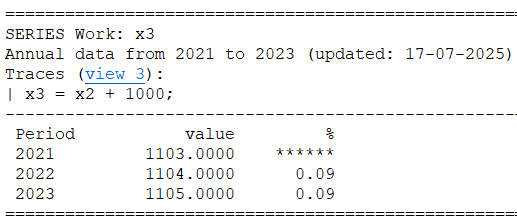
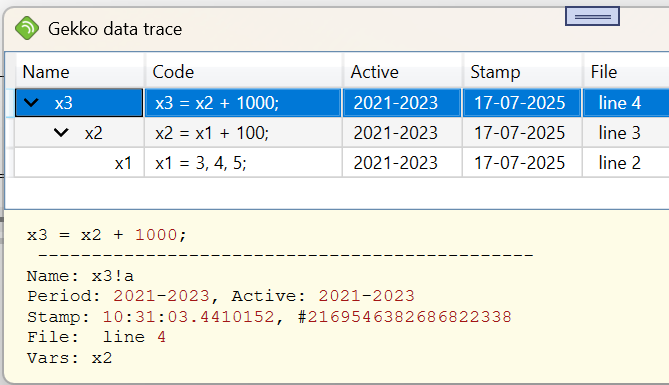
Note the shown data-trace x3 = x2 + 1000;, cf. TRACE. If you click the view 3 link, you will see all the data-traces in the trace viewer (shown on the right). From the trace viewer, it is possible to trace the values 1103, 1104 and 1105 back in time to their origins. For more complicated data construction, such traces can be very useful.
If a model is loaded, you will be able to see which variables the given variable affect (dependents). You will also see the equation (if the variable is endogenous), and hence the variable's precedents. These variables are clickable, so the DISP statement functions as an entrance to the equation browser. You may get output like this:
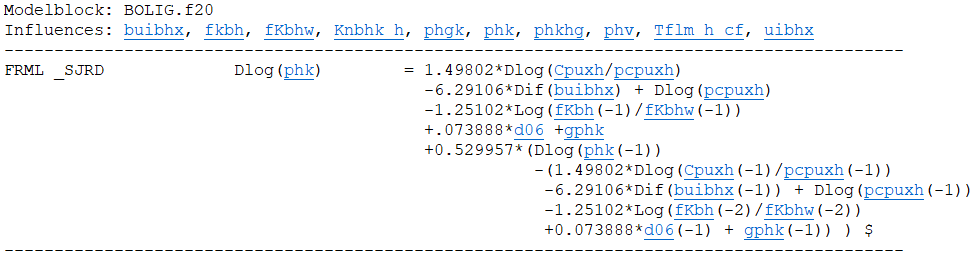
where 'Influences' list shows the dependents, and the clickable variables in the equation are the precedents.
When using DISP, wildcards can be used (in the same way as for INDEX, etc.):
disp bank2:x*!q; |
This displays quarterly series starting with x, from bank2. Per default, only 3 lines of data is written when DISP'ing a variable. However, you can click the link ('show') to see any hidden periods.
You may search for meta-information labels in the following way:
disp 'import'; |
This will list all variables with a label containing this search string.
Regarding DISP of GAMS model equations, see the description of the model <dep = ...> local option under MODEL.
The disp<info> is called automatically if failsafe mode solving is set (option solve failsafe yes) and the simulation of a Gekko model fails.
DISP shows meta-information in the following way:
•If there is a variable list contained in the model file (.frm file) or as an external varlist.dat file, this information is shown first, and the lines are shown in raw form, line by line exactly as they appear in the variable list.
•If the timeseries itself contains meta-information (cf. DOC), this is shown afterwards. A label field is shown as it is, a source field is shown with "Source:" prefix, and a unit field is shown with "Unit:" prefix.
option model type = default;
option print disp maxlines = 3;
option print disp model gams scalar = modern;
option model gams dep current = no;
option model gams dep method = both;
option model gams scalar data = no;
option model gams scalar normalize = no;
DECOMP, FIND, MULPRT, PLOT, PRT, TELL