|
<< Click to Display Table of Contents >> Printing |
  
|
|
<< Click to Display Table of Contents >> Printing |
|
To see the contents of Gekko-timeseries (and other variables), the PRT statement is often used.
Note: PRT can print mixed frequencies in the same print. |
The statement prints output on the upper part of the Gekko main window, for instance:
reset; time 2010 2014; |
Result:
x1 % x2 % |
PRT prints the levels (4 decimals), and in addition, percentage growth rate (2 decimals). The number of decimals etc. can be controlled via options (see option print ... under options). (Note that after a print has been shown in Gekko, you may click the "Copy" button in the user interface and paste the printed "cells" into for instance Excel).
The PRT statement can also be used to print mathematical expressions. The following example prints the ratio between the two series x1 and x2:
//continued |
Result:
x1/x2 2010 1.1538 2011 0.8571 2012 0.8750 2013 1.0667 2014 0.7500 |
Here, percentage growth is suppressed with option <n> (for levels). There are a number of operators like <n> available, which can be seen on the PRT page, for instance <p> for percentage growth, etc.
Ref databank comparison
PRT can also be used to compare values in the first-position databank with values in the Ref (reference) databank, for instance like this:
reset; time 2010 2014; |
Result:
x1 <r> <m> <q> 2010 13.0000 15.0000 -2.0000 -13.33 2011 14.0000 12.0000 2.0000 16.67 2012 16.0000 14.0000 2.0000 14.29 2013 15.0000 16.0000 -1.0000 -6.25 2014 16.0000 12.0000 4.0000 33.33 |
This PRT statement prints levels in first-position databank (<n>), levels in Ref databank (<r>), absolute difference (<m>), and relative difference (<q>). The n, r, m and q letters are so-called print operators (there is a separate <i> option to print as index = 100).
Lists
The PRT statement has a lot of functionality ready regarding lists of variables, or variable names composed of lists of "codes". A few examples:
reset; |
Result:
s xa xb xc um(#m, x{#m}) 2010 1.0000 2.0000 3.0000 6.0000 2011 1.0000 2.0000 3.0000 6.0000 2012 1.0000 2.0000 3.0000 6.0000 |
Array-series
Instead of composing names like xa, xb, xc, such a naming pattern can also be implemented via array-series., which were mentioned earlier on in the user guide. You may try the following nearly identical example:
reset; |
Result:
s x[a] x[b] x[c] um(#m, x[#m]) 2010 1.0000 2.0000 3.0000 6.0000 2011 1.0000 2.0000 3.0000 6.0000 2012 1.0000 2.0000 3.0000 6.0000
x[a] x[b] x[c] 2010 1.0000 2.0000 3.0000 2011 1.0000 2.0000 3.0000 2012 1.0000 2.0000 3.0000
========================================================================================== SERIES Work: x Annual series has 3 elements in 1 dimensions (period 2010 - 2012) Dimension 1 (3 elements): a, b, c First/last elements (alphabetically): x[a] ... x[c] ========================================================================================== |
As it is seen from the last PRT statement, with an array-series, you can use the convenient prt x; to print all the sub-series inside x, and DISP will print general info on the dimensionality of x etc. In general, array-series can be handy for variables with well-defined dimensions like sectors, countries, age groups, etc.
Wildcards
You can use wildcards to print out timeseries. In that case, for PRT you have to use the notation {'...'}, for instance like this:
reset; |
Result:
x1a x2a 2010 1.0000 2.0000 2011 1.0000 2.0000 2012 1.0000 2.0000
x1a x1b 2010 1.0000 3.0000 2011 1.0000 3.0000 2012 1.0000 3.0000 |
Without the {'...'} notation, prt <n> x*a; will fail with an error, complaining that the variables x and b can not be found (it expects to multiply them). Statements like INDEX, COPY and others do not need that notation, because they do not accept mathematical expressions, and therefore the following:
//continued |
Produces this:
x1a, x2a
Found 2 matching items |
The PRT statement can also print other variable type like scalars or lists. Note that MEM is handy for printing out all scalar variables from all databanks.
DISP
Another way of printing timeseries is using the DISP statement. This statement does not accept mathematical expressions, and only prints one timeseries at a time.
reset; time 2010 2014; |
Result:
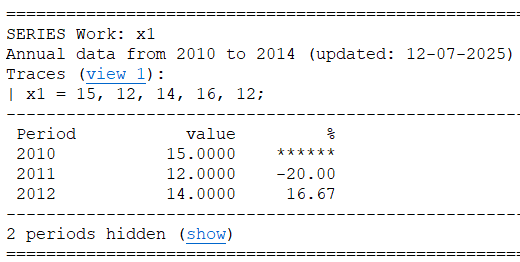
The DISP statement show more information on the timeseries, for instance frequency, data period, last updated time, and the source of the variable. It may also show other forms of meta information, like explanation, unit, etc. When a model is loaded, DISP can be used to start equation browsing. Wildcards may be used, like disp x*;.
Note that DISP also shows data-traces, tracing the values of the timeseries back in time. If you click the link (view 1), the trace viewer window opens up. For more interdependent timeseries calculations, data-traces can be very practical.