|
<< Click to Display Table of Contents >> DOC |
  
|
|
<< Click to Display Table of Contents >> DOC |
|
The DOC statement is used to change meta information fields in a timeseries variable. This information is stored when a databank is written to a .gbk databank file. The meta information is shown in DISP statement (when doing modeling: together with any meta information stored inside a model .frm file or in an external varlist.dat file). You may use doc <varlist> to meta import information from a .frm or varlist.dat file into the timeseries variables themselves.
The DOC statement may alternatively be used to produce a stand-alone html browser of a model's equations (doc <browser>).
doc variables LABEL=... SOURCE=... UNIT=... STAMP=... ;
doc <varlist> FILE=... ;
doc <browser>;
variables |
Variablename(s) or list(s) (wild-cards are allowed). You may prepend a databank name as bank:variable. |
LABEL= |
(Optional). Changes the label of the timeseries. You may use LABEL='' to clear. |
SOURCE= |
(Optional). Changes the source of the timeseries. You may use SOURCE='' to clear. |
UNIT= |
(Optional). Changes the unit of the timeseries. You may use UNIT='' to clear. If you prefer, you may use units=... instead of unit=.... |
STAMP= |
(Optional). Changes the stamp of the timeseries. You may use STAMP='' to clear. |
VARLIST |
(Optional). Get/import labels from Gekko model or from file. |
FILE= |
(Optional). Possible file name for <varlist>. |
BROWSER |
(Optional). Generate html browser. |
•If a variable is stated without databank, the databank is assumed to be the first-position databank.
doc <varlist> imports meta-information from a loaded MODEL (See the section "Gekko models: variable list"). With doc <varlist> file=... ; you may indicate a file containing the meta-information (for instance a file named varlist.dat).
doc <browser> produces a stand-alone equation browser in html, which can, for instance, be put on a web server. The produced system of html files is independent of Gekko and shows variables, formulas, labels, graphs, estimation output, data, etc. In essence, the system replicates how DISP can show equations etc. from inside Gekko.
To change label, source and stamp on the timeseries fY, use:
doc fY label='Gdp' source='Statistics Denmark' stamp='11-01-2024'; |
To clear the label, use an empty string:
doc fy label=''; |
You may delete all label/source/unit meta information in the first-position databank like this:
doc * label='' source='' unit='' stamp=''; |
If you would like to store meta information in a spreadsheet varlist.xlsx, you can get this meta information into databank.gbk with something akin to the following (depending upon how you design the spreadsheet). Here, the text information in the spreadsheet is designed with one row per timeseries: column 1 is the series names, column 2 is the labels, column 3 is the sources, and column 4 us the unit (the first row of the spreadsheet is skipped). See LIST regarding list indexing like [.., 1] etc.
sheet <import list> #v file = varlist.xlsx; |
Html browser
If you first load a model with model (preferably the model .frm file includes a variable list, or a variable list is supplied from a varlist.dat external file) and read one or two databanks with read, you may issue a doc <browser> afterwards:
reset; |
The doc <browser> statement will produce a html browser in a \browser sub-folder to your current working folder. Open the folder and start up index.html in a web browser to proceed. The html browser is stand-alone and hence independent of Gekko, model files or databank files, and plots and prints are shown for the given period (in the above example: 2010-2025). The variable pages look like the following:
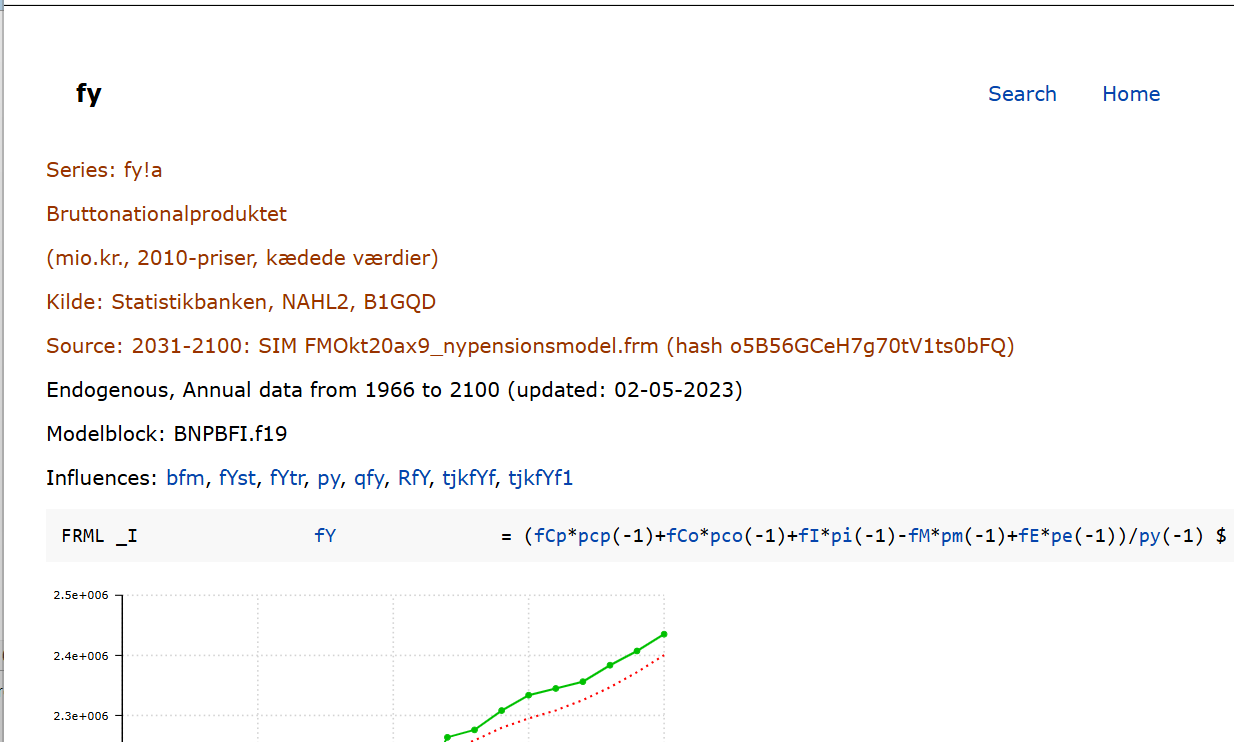
If you want to tweak the layout, you may put a browser.json file in your working folder. The settings are as follows (with example values):
{ "index_filename": "ADAMdok.html", //Name of main html page "list_filename": "list.html", //Filename for for list "find_filename": "find.html", //Filename for the search page "css_filename": "styles.css", //Styles used in the html pages "dok_filename": "supdok.lst", //Possible extra output "est_filename": "est.lst", //Possible estimation output "icon_filename": "figen.ico", //Icon file, used in index_filename "vars_foldername": "vars", //Sub-folder name (also used in index_filename) "commands": "<gekko commands>", //Gekko commands to set up model and databanks "plot_start": "2010", //start for plots "plot_end": "2030", //end for plots "plot_line": "2022", //vertical line for plots "print_start": "2020", //start for print "print_end": "2030", //end for print "show_source": false, //show source information (labels), true|false "include_p_type": "no", //include P equations ("predict-equations")? "yes"|"no" "ekstrafiler": [ "okt20.frm"] //Files used by index_filename } |
If you do not want to show graphs/prints of variables from a Ref (reference) databank, you may use read <first>mybank; so that there will be put no variables in the reference databank (omitting the <ref> makes Gekko produce a reference databank as a clone or the first-position databank).
Meta information like this is read from and written to .gbk (or .tsd) files. For other file types, meta information support is limited.
Regarding meta-information on timeseries, you may set these directly when defining the series, for instance vat <label = 'Value added tax'> = 0.25;.
DISP, EXPORT, IMPORT, READ, WRITE