|
<< Click to Display Table of Contents >> Gekcel (Excel add-in) |
  
|
|
<< Click to Display Table of Contents >> Gekcel (Excel add-in) |
|
Gekcel is a Gekko add-in for Microsoft Excel. Gekko proper already has Excel interfaces (the SHEET, IMPORT and EXPORT statements), but these are called from within Gekko, using the Gekko graphical user interface (GUI). Instead of using these Excel interfaces from within Gekko, the Gekcel add-in does the inverse: that is, the add-in makes it possible to use Gekko from within Excel. Gekcel allows all Gekko components to be used from within Excel, including read/write of Gekko databanks (.gbk) etc.
Note: The Gekcel interface is quite basic and simple in its current version. See the section on "Further development" regarding how the interface could be augmented and refined in the longer run. To use Gekcel, you need Microsoft Excel installed on your pc (Gekcel will not work for LibreOffice, Google Sheets or similar). About installation, see the guided tour. |
When using the Gekcel add-in, only Excel is opened up, and the Gekko GUI is not shown at all. In Excel, Gekko results are shown in the current worksheet tab (as Excel cells), and/or in the so-called "Immediate Window" (more on this later on). For instance, when using the Gekcel add-in, the user can issue Gekko statements from within Excel, like for instance statements that read a Gekko databank or print timeseries.
The following Excel VBA (Visual Basic) script illustrates how to read a databank and print out the ratio of two timeseries x1 and x2:
Public Sub Demo() |
This syntax etc. will be explained in more details in the following sections, so it is just to illustrate that interacting with Gekko via VBA scripts is quite easy when using Gekcel. As an alternative to using VBA, the so-called Excel "Immediate Window" can also be used to the same effect. The result of the above VBA code will look like the following in Excel:
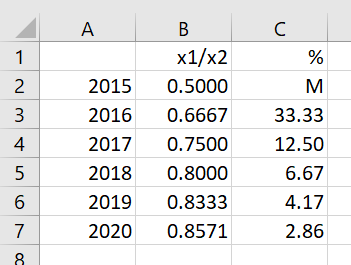
If, instead, the user starts up Gekko proper and the corresponding statements are typed into the Gekko GUI input window:
read demo.gbk; |
the following would be shown in the Gekko output window:
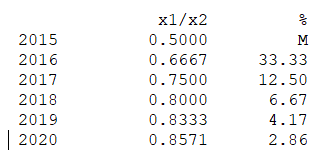
So in that sense, the Gekcel add-in for Excel is capable of showing the same kinds of results that the normal Gekko program does. The familiarity of using an Excel spreadsheet is one of the reasons that the Gekcel add-in was developed. Calling an add-in from within Excel may seem a less daunting task than opening up the full Gekko program and issuing statements from there.
The Gekko add-in is not limited in any way, so anything Gekko can do can also be done via the add-in. The add-in is also complete in the sense that nothing else than the add-in needs to be installed in order to use Gekcel.
Read more about Gekcel in the sub-sections.