|
<< Click to Display Table of Contents >> Simple example |
  
|
|
<< Click to Display Table of Contents >> Simple example |
|
The Gekko graphical interface is found in Gui.cs. These files (there are some child-files like Gui.designer.cs etc.) control the interface, including mouse clicks, keyboard input etc. At the moment, the main GUI is made in .NET WinForms, but will later on be translated to .NET WPF (a more modern technology for describing graphical interfaces). The other windows callable from Gekko are mostly in WPF.
When the user issues a command in the command input window (i.e., types [Enter]), the graphical interface sends the line to the method StartThread() in Gui.cs, with the input line as a string argument. The command line is put into a waiting list of commands, and when all other previous commands have ended, the current command gets started by means of a thread (this keeps the graphical interface responsive during time-consuming commands). The command(s) is added to the thread by means of gui.threadInput = gekkoCommands; (where gekkoCommands is a text string), and the thread is started with gui.threadWorkerThread.Start();. The thread calls/starts WorkerThreadFunction(), also from Gui.cs.
The following methods reside in Program.cs. The before-mentioned WorkerThreadFunction() calls the Run() method in the LongProcess class (inside Program.cs), which calls RunGekkoCommands() (also from Program.cs). This is the main entry into the code dealing with the execution of Gekko commands, where Gekko command are parsed, converted into dynamic C# code, and executed. The RunGekkoCommands() method calls the following:
•Program.HandleGekkoCommands()
•/Parser/Gek/ParserGekCreateAST/ParseAndCallWalkAndEmit()
•/Parser/Gek/ParserGekCompileAndRunAST/CompileAndRunAST()
The first method adds some syntax "glue" character to the Gekko commands, so they are more easily processed by the parser, cf. here. The next method calls ANTLR to produce an AST tree, which is subsequently walked, while emitting C# code. The last method compiles this dynamic C# code and runs it.
So to sum up, the main entry point regarding Gekko commands being parsed, transformed into dynamic C# code, compiled and run is the RunGekkoCommands() method.
Example
As a simple example, consider the user input TELL 'Hello';. This is a simple command that prints 'Hello' in the GUI output window. The example has been a little bit simplified for clarity, but not much.
The input line gets transformed into an AST tree by means of the ANTLR parser, using this grammar (much more on AST tree creation here):
tell: TELL ('<' NOCR? '>')? expression? -> ^(ASTTELL ^(ASTPLACEHOLDER expression?) NOCR?); |
The TELL command allows a TELL<nocr> option, but besides that, it just accept an expression (which Gekko will try to extract a string from). The example command TELL 'Hello'; will produce the following AST tree:
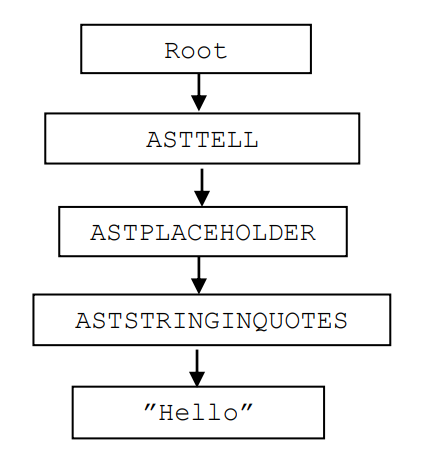
This tree is particularly simple, since the command is so simple (it contains no arguments for instance). As mentioned in the section on AST trees and C# snippets (here), Gekko emits C# code when returning from a branch (that is, moving upwards in the tree). This first happens regarding ASTSTRINGINQUOTES, cf. the code below:
.... |
This is a big switch statement inside the WalkASTAndEmit() method, in /Parser/Gek/ParserGekWalkASTAndEmit.cs. When ASTSTRINGINQUOTES is encountered, it takes the string "Hello" (which is in the .Text field of the first child node, node[0]) and produces the following C# snippet: new ScalarString("Hello"). Note here, that the symbol ` is used as a convenience to signify a double quote (") in the resulting C# code (instead of using the cumbersome \").
When returning from the ASTSTRINGINQUOTES and moving upwards, ASTPLACEHOLDER is encountered. This node does not do anything, as the name suggests. Next upwards is ASTTELL, and as it is seen in the C# switch statement, C# uses node[0][0].Code. This means finding the first child of ASTTELL, and then the first child of that child, that is, the ASTSTRINGINQUOTES node. In this node, the .Code field is fetched, that is, the C# snippet new ScalarString("Hello"). Therefore, the C# code corresponding to the ASTTELL node ends up being O.Tell(O.ConvertToString(new ScalarString("Hello")), false);. This means constructing a ScalarString object/IVariable (with "Hello" inside), and then use the method O.ConvertToString() on that object. This will just return the C# string "Hello", but the O.ConvertToString() will also catch the cases where an illegal variable type is fed to the TELL command. Finally, the O.Tell() method is called, which does the actual printing on the screen, and expects a C# string and a boolean as input (the boolean indicates whether <nocr> option was used in the TELL command).
The TELL command just calls the static method O.Tell(), but more complicated commands may construct an object from a specific class in O.cs, and use that object to run the command (for instance O.Sim o1 = new O.Sim(); ... ; o1.Exe(); to perform a simulation).
The full emitted code is the following:
using System; |
What gets called from Gekko is TranslatedCode.CodeLines(new P()). The P object is just a helper class to keep track of command files calling each other, and other similar stuff. In the first line of CodeLines(), another object is constructed, namely a GekkoSmpl object. This object stores information about the current time period that a given command must be run over (not relevant here), and the time period is set with O.InitSmpl() (again, not relevant here). Next, the method C0() is called.
Why C0()? This is because Gekko splits long command files (corresponding to long C# methods) into smaller parts, which makes the C# compiler run much faster. Why this is so is a bit of a mystery, but it probably has to do with the C#.NET compiler trying to optimize the resulting machine code (MSIL), and this optimization runs wild if the method has too many lines.
Inside C0(), the p object has the text "¤1" set, which just means that the following code is line 1 from user input (if it had been line 5 from a demo.gcm file, the text would have been "demo.gcm¤5" instead).
O.InitSmpl() is called again, and finally the TELL statement. As it is seen, O.Tell() does not use smpl at all (because the statement does not involve timeseries), but a lot of other Gekko commands and functions do, and these need to know about time periods.
The actual call of the above dynamic C# code takes place in the method CompileAndRunAST(), found in /Parser/Gek/CompileAndRunAST.cs. The actual call looks like this:
Type tpe = assembly.GetType("Gekko.TranslatedCode"); //the class TranslatedCode |