|
<< Click to Display Table of Contents >> AST trees emitting C# snippets |
  
|
|
<< Click to Display Table of Contents >> AST trees emitting C# snippets |
|
Note: in general when investigating how Gekko translates from Gekko commands to C# code, it should be noted that issuing the "command" --ast in the main Gekko window activates printing of both the AST tree and the emitted C# code for subsequent commands. This way, it is easier to see what kind of C# code a particular Gekko command produces. |
In the introducory section on parsing, it was mentioned that a common strategy regarding parsing of for instance a Gekko command file is to first chop up the program into tokens (those can be thought of as 'words', or chunks of characters). Chopping up into tokens is done by means of a so-called lexer (also known as tokenizer), and the lexer then feeds the parser with tokens. It is important to realize that the parser knows nothing of the individual characters contained in the Gekko command file: it only sees the tokens fed to it (and the type of those assigned by the lexer).
Since Gekko command files are translated into C# code, the parser somehow has to be able to emit valid C# statements corresponding to the tokens it encounters. To this end, the parser emits a so-called AST tree, which is a tree-like structure corresponding to the Gekko command file, but much more simple to convert into corresponding C# code than the raw Gekko command file (consisting of a sequence of characters without any structure).
A simple example of how a series statement was handled was provided in the section Gekko as a translator, and in this section we will look into the translation task in much more detail, this time with a value statement. In the former sections of this section the basic data structures and their common IVariable interface were introduced. Using this interface makes it easier to translate from a AST tree to C# code.
It probably pays off to state a very simple example, instead of presenting the full parser and translator. Boiled down to its essentials, and simplified to a large extent, a Gekko scalar value statement can be parsed and translated in the following way (it should be noted that the example below ignores the question of upper/lower case of letters regarding command names):
// ----------------- PARSER ------------------------------------------------------------------------------- |
Lexer part explained
We will start explaining the bottom part, that is, the lexer. In ANTLR, all lexer/token rules start with upper case of their names, whereas the parser rules start with lower case (this makes them easier to distinguish by name). Each time the lexer matches something, it will emit a corresponding token. For instance, if recognizing a floating point number, it will emit a Double token (with the actual number, for instance 1.23, inside the token). The three fragment rules at the end are special in that they do not emit tokens, but are just helper rules to avoid repetitive typing in the 'real' lexer rules. The fragment Exponent matches stuff like e+12 or e15, whereas the DIGIT fragment matches a digit between 0-9, and the LETTER fragment matches a letter between a-z or A-Z.
To start from the beginning of the lexer rules again, the Ident ('identifier') token matches sequences of characters beginning with a letter or underscore (the | operator means logical OR), followed by any number (including none) of characters that are either DIGIT or LETTER or underscore (_). This is the way variable names are usually composed. We allow x1, aaa, _a_b etc., but we do not allow a variable to start with a digit (for instance 2005dummy or the like). The star (*) in the Ident rule means that any number of repetitions of the parenthesis is allowed. The other operators are + for at least one, and ? for either none or one. The Integer token matches a sequence of digits, whereas the Double token matches floating point numbers (optionally with exponents). In a similar way, the Date token is composed of 1 or more digits, followed by the character q or m, and ending with one or more digits (for instance 2000q2). We abstract here from other frequencies than a, q or m.
The reader might ask whether or not a token like '2010' is a Date? In our case, 2010 will be matched as an Integer. Even if the definition of Date contained the possibility of matching '2010', that token would still be matched as an Integer for the simple reason that the Integer rule is stated before the Date rule. Such 'shadowing' of lexer rules may be confusing, and in the parser we have to deal with the possibility that a token like '2010' can both be interpreted as a number, or as a date (of annual frequency).
Finally, the lexer contains some more complicated rules, namely rules regarding strings and white-space (blanks).
StringInQuotes tells the lexer to look for a hyphen ('). Note that the \' is an escape character for a hyphen, so '\'' is a hyphen character (with hyphens around, just like for instance the x character with hyphens around: 'x'). If a hyphen is found, the lexer skips through all non-hyphen characters (~ means logical NOT) until another hyphen is met. Such strings may contain anything, including blanks. In reality, string matching is a bit more complicated in Gekko, because Gekko 3.0 supports string substitution, for instance the string 'a{%s}b', where the string %s is inserted inside another (outer) string.
Finally, there is the WHITESPACE rule. This rule matches one or more blanks (' '), and discards them (channels them to a hidden channel). So there will be no white-space tokens emitted, entailing that the expression a+b*c will emit exactly the same tokens as a+ b * c. There are many advantages to this approach, because else the parser rules would become polluted with optional white-spaces almost everywhere. But there are a few disadvantages, too. For instance we might prefer that function calls should be f(x) with f (x) not allowed, or that a lag indicator must be glued to its variable (x[-1] or x.1 is ok, but not x [-1] or x .1), or we might prefer that components of composed names are also glued together (x{%i} as a name is ok, but not x {%i}). All this (and the question of how to ignore letter upper/lower case) is dealt with in a special manner that we abstract from right now (parser glue symbols).
Parser part explained
The parser part also matches rules, but where the lexer assembles 'atoms' (characters) into 'molecules' (strings/words), the parser assembles 'molecules' (strings/words) into a tree structure representing the Gekko command file. We might for example imagine the simple statement
%x1 = 10 * %x2 + %x3; |
When the lexer is fed with this line, it emits the following tokens:
1 |
2 |
3 |
4 |
5 |
6 |
7 |
8 |
9 |
10 |
11 |
|
Type |
|
Ident |
|
Integer |
|
|
Ident |
|
|
Ident |
|
Value |
% |
x1 |
= |
10 |
* |
% |
x2 |
+ |
% |
x3 |
; |
Next, the parser tries to make sense of these tokens: that is, find a sequence of syntax rules that matches the tokens. It starts with the parser rule assignment, and sees that the first part of this rule is type?, which is optional (can be skipped). When skipping the type indicator, the next rule is name. The name rule allows sigil (prefix symbol %) followed by Ident (x1) assignment, matching %x1 as a name. The = in the assignment rule matches the third token. Next in the assignment rule is a reference to the expression rule, corresponding to the right hand side of the equation (omitting the ending semicolon).
The expression rule is recursive in the sense that it is able to call itself (if the expression contains parentheses, or in a real world example also indexers [], function calls etc.). In the present scaled down example, we have omitted exponentiation, indexers, functions and other components, but it can still get complicated enough. The parser outputs the following AST tree:

To understand the additiveExpression rule, for an expression without parentheses it finds the plus (or minus) operators and creates a node with a + (or -) as parent. It sees that there is an additive expression, where the left part (10 * %x2) of the additive expression is another expression (namely a multiplicativeExpression). If the expression had contained parentheses (for instance %z1 = 10 * (%x2 + %y3)), a recursion would have occurred in the primaryExpression rule, calling expression again (and the resulting tree would have been different, with a * node before the + node).
Because the additiveExpression precedes the multiplicativeExpression, the AST tree respects operator precedence, and it is noted that the + node appears before the * node in the resulting AST tree, even though the * appears before the + in the statement. The parser used (ANTLR) is very good at breaking up even long and complicated expressions into such trees, and does so very quickly.
In order to produce C# code from such an AST tree, the AST tree has to be looped while pieces of C#-code are emitted. In older Gekko versions, a global C# string was built gradually while walking/looping the tree, but that approach entailed a lot of disadvantages. For instance, when encountering the + node, we would like to emit code corresponding to Add({1}, {2}), where {1} and {2} are two placeholders representing the sub-nodes of +. But when the + is first encountered, we do not know what these sub-nodes contain, so the approach was to emit Add( to the master string, and then try to remember that a , had to be added to the master string just after the first sub-child had been finished, and that a ) had to be added to the master string after the second and last of the children had been finished. Needless to say, such logic gets complicated, and it was hard to judge from the code that Add({1}, {2}) was actually the pattern that was getting built at the + node.
Therefore, the approach was changed, so that each node now holds its own snippet of C# code. The idea is that nodes are not handled until after their sub-nodes have been handled. So a node is handled when the tree walker is on its way back through this particular node.
The AST structure tells us how to evaluate the expression: start with the multiplication, then do the addition, and put the result into %x1. When walking such a tree, the downwards pointing arrows can be followed, and each time there are no more arrows to follow (at so-called terminal nodes or "leaves" of the tree), we backtrack and take the next path. This can be illustrated as follows, where the blue arrows descend, and the red arrows backtrack (the numbers in parentheses indicate the order in which the nodes are visited).
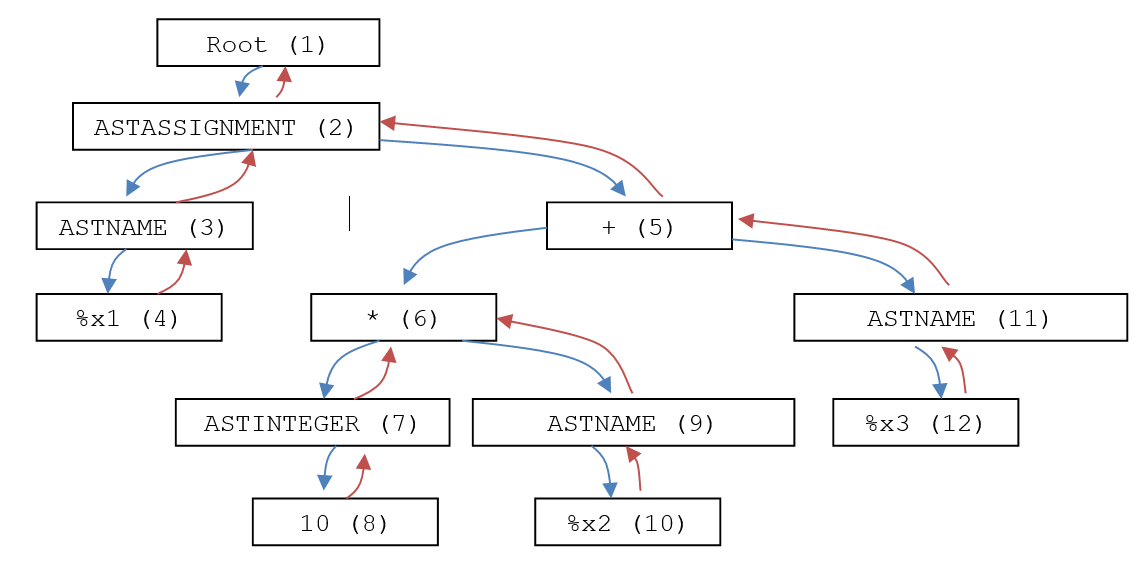
So the first time we encounter a red arrow (that is, backtracking) is after node (4) is finished, backtracking on the way back to node (3). At this exact point, Gekko emits the following C# snippet: O.Lookup(smpl, "%x1", temp), where the %x1 is found by simply looking into node (3)'s one and only child (node (4)). This piece of C# code is stored in the node itself.
The reason why the method is named O.Lookup() and not just Lookup() is that all methods that are called from dynamic code (like here), are stored in the O.cs file (O class) in Gekko. Another thing to note is that all the method calls include a smpl argument. This is an object that stores information about the current time period ("sample"), because for timeseries operations, we need to be aware about the time period over which calculations are to be performed. In this particular example, smpl is not actually used, because we are operating on scalars,
Next, let us take a look at node (7). When node (7) is encountered while backtracking, Gekko knows that ASTINTEGER is a simple integer, so it simply emits the following piece of C# code: new ScalarVal(10). The 10 if found by looking at the one and only sub-node (8). Later on, when backtracking in node (9), the following piece of C# code is emitted: O.Lookup(smpl, "%x2"), where the %x2 is easily obtained from the one and only child (10) of node (9). Next, while backtracking, we encounter the multiplication in node (6). This multiplication uses the pattern O.Multiply(smpl, {1}, {2}), where {1} and {2} are placeholders representing the left and right sub-branch below node (6). But since we are backtracking, we already know the C# code corresponding to {1} and {2}, since these are new ScalarVal(10) and O.Lookup(smpl, "%x2"), respectively. So the stored code in nodes (7) and (9) is used, resulting in the following C# code to be put into node (6): O.Multiply(smpl, new ScalarVal(10), O.Lookup(smpl, "%x2")). The O.Multiply() method itself exists among the inbuilt C# methods of Gekko, and takes two IVariable's as arguments, and new ScalarVal() and O.Lookup() both return an IVariable, too. The O.Multiply() method also returns an IVariable, so in that way IVariable objects are passed around between the nodes in the AST tree.
The + node (5) is made in a similar manner, out of the C# code pattern O.Add(smpl, {1}, {2}), where these two arguments correspond to C# code stored in node (6) and node (11), respectively. The resulting code in node (5) will be this: O.Add(smpl, O.Multiply(smpl, new ScalarVal(10), O.Lookup(smpl, "%x2")), O.Lookup(smpl, "%x3")). Finally, when backtracking in node (2), all the code is assembled. The following pattern is used: IVariable temp = {1}; O.Lookup(smpl, "%x1", temp);. The temp (temporary) variable is the right-hand side (RHS) of the assignment, and this is fed into a lookup method that accepts both a name (%x1) and a IVariable (here: temp). This particular lookup method is for right-hand side (RHS) assignments, where it assigns a right-hand side (RHS) to a left-hand side (LHS).
So the resulting dynamic C# code, assembled step by step while backtracking, becomes the following:
IVariable temp = O.Add(smpl, |
Below, this back-propagation process is illustrated by showing the C# snippets in each node, and it is seen that the code is smaller near the leaves of the tree, and gets more and more bulky as we move (backtrack) upwards.
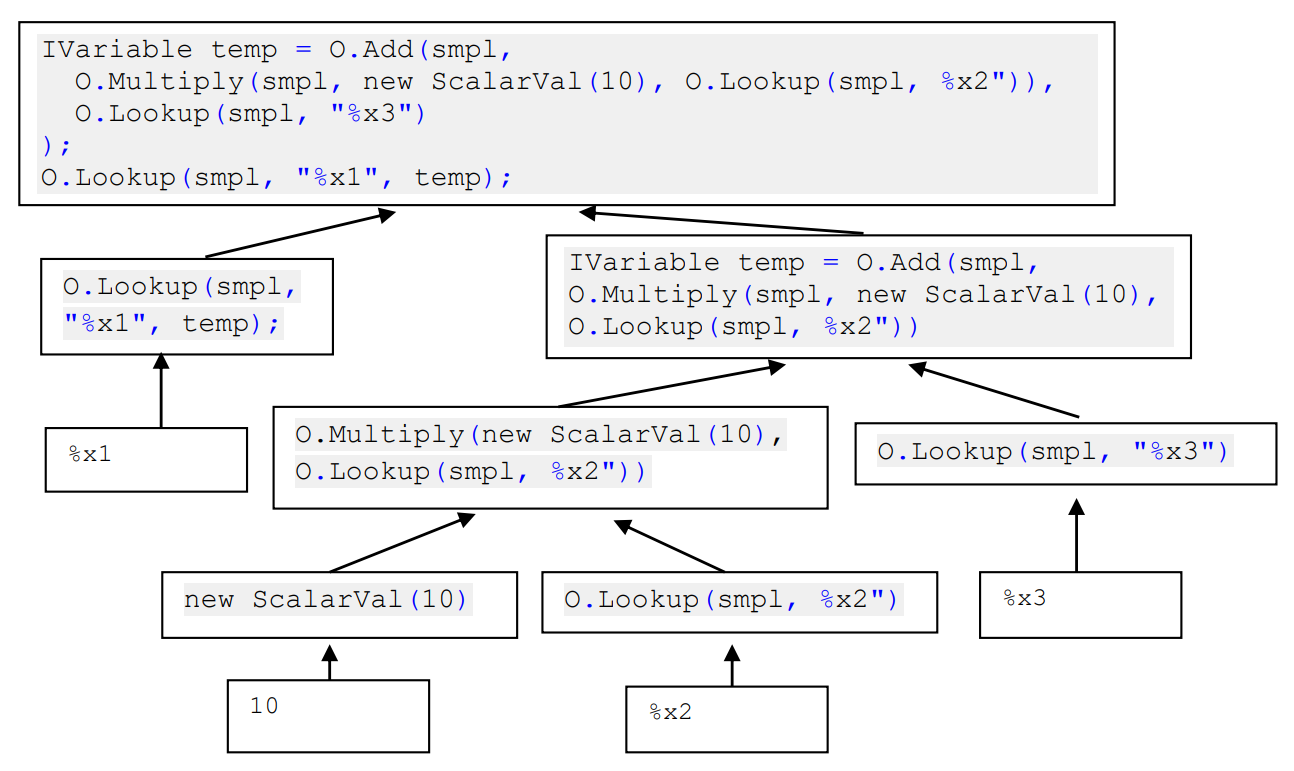
The code pieces feed into each other, and the code pieces become larger and larger. This makes the code emitting the C# snippets reasonably easy to read and understand. In the Gekko component that emits C# snippets (more on this component here), we will find something like the following:
if(node.Text == "+")
{
node.Code = "O.Add(smpl, " + node[0].Code + ", " + node[1].Code + ")";
}
Here, node.Text is the actual text of the node, in this case +. In addition to this text, each node stores C# snippets in the field .Code. Above, node[0] refers to the first child of the node, and node[1] to the second one, so their C# snippets are used to form the O.Add() statement. This way of emitting C# code makes the process rather easy to understand.
Conclusion
Above, we have been working our way through a particular ANTLR 'toy' parser grammar being capable of parsing a simple assignment statement, and producing a corresponding AST tree. Given an example statement, we have seen how ANTLR transforms the statement into a tree, and it has been described how C# code snippets can be produced (and stored in the tree itself) while 'walking' the AST tree in a recursive fashion. The snippets are best produced while backtracking, that is, when the tree walker is on its way back through a given node, after having visited all of its sub-nodes. At that point of time, the sub-nodes in turn have emitted the C# code that they have to emit, and this allows us to compose the C# snippet corresponding to a given node in a very straightforward and natural way.
All in all, putting code snippets into all the AST nodes creates a little bit of overhead and RAM use, but the benefits are large. Doing it this way, AST nodes can be handled very naturally, without knowing anything of their sub-nodes (other that the code they contain). And using IVariable's as 'messengers' tying the nodes together has the advantage that the C# snippets contained in each node fit seamlessly together. Remember also, that all this takes places during parsing and compilation of statements (and only once per program). And as soon as the Gekko program (command file) is actually running, the AST tree is garbage collected and will not occupy RAM anymore.