|
<< Click to Display Table of Contents >> How to understand commands? |
  
|
|
<< Click to Display Table of Contents >> How to understand commands? |
|
As mentioned in the preceding sections, we might imagine this Gekko assignment of a timeseries x1 (below, this is called a "series statement"):
x1 <2010 2015> x1 = 150; |
How is Gekko to understand such a series statement? The intention of the command is pretty clear: set the value of the timeseries x1 to 150 for the years 2010-15 (we presume that the frequency is annual here). The command is part of a domain specific language (DSL), that we could call the Gekko language. Sometimes, such DSL languages are referred to as script languages, and the essence of DSL languages is that they provide a logical and compact way of writing code in a specific domain or field. In our case, the domain is the timeseries and modeling domain (examples of well-known DSL languages could be HTML or SQL).
So, the implicit purpose of the Gekko language is to make timeseries and model handling as easy as possible, using a hopefully rich, logical and productive syntax. It is the belief that a well thought out syntax is a crucial point for the long-term success of software like Gekko. If the syntax is clumsy, awkward, difficult to remember, old-fashioned or involves excessive typing, the users will grow tired of it. That is why Gekko uses syntax like the the above-mentioned series statement, instead of more readily machine-readable syntax like
SetSeries("x1", 2010, 2015, 150); |
Such syntax would not need any translation at all in order to be run by C#, but users would grow tired of typing the parentheses, quotes etc. (and command files would be hard to read). So we need to somehow interpret the original series statement, and to this end there are different strategies.
1.Simple chopping up by hand
2.Using a tokenizer
3.Using a parser
Chopping up by hand
It might come as no big surprise that Gekko originally started out with (1), but only for a few months before the burden of hand-chopping already became too heavy. This strategy simply treats x1 <2010 2015> = 150; as a sequence of characters that needs to be decomposed into smaller elements and executed. A statement like this example is not that difficult to handle, since it contains no nested parentheses, commas or the like (the statement is quite 'flat' in that sense). We might split the statement at each space, <, >, =, and it would be pretty easy to get it decomposed into x1, <, 2010, 2015, >, =, 150, ; (whitespace is omitted here). So an interpreter reads one line, splits it up, and then executes the contents. When the execution is finished, the next line is read, split up, executed, and so on.
As long as the lines are not too complicated, this is pretty straightforward, but still entails a lot of iterating over characters and strings. When things get more complicated, for instance if the value 150 was instead a mathematical expression containing function calls etc., this strategy can produce quite messy and error-prone code (imagine searching back and forth for matching parentheses, while remembering to skip out-commented code that might itself contain parentheses etc. etc.).
Running an interpreted statement in this way is also inherently slow, since chopping of the strings is performed each time the statement is called (for instance inside a loop). In addition, more complicated data flow constructs like loops, functions, subroutines, if-statements (conditionals) etc. must be handled by the interpreter itself, since this job cannot be leveraged to C#. So the interpreter must keep lists and stacks containing information on where a given function or subroutine was called from, its parameters and return value etc, in addition to keeping track of nested loops, conditionals etc. This is a tedious and error-prone undertaking, and there will be a lot of overhead of letting the interpreter do this job, instead of letting the "mother language" (C#) take care of it.
On the positive side, chopping up can provide fast execution of simple lines that are to be executed only one time (imagine a file containing millions of simple series statements). In that case, the overhead of parsing and compiling each of these lines does not pay off, since each of the lines are only run once. On the other hand, the result of such data-containing lines could be put into a databank, or else a text-based database format could be defined (or .csv or .prn could be used instead).
Tokenizer
To avoid a lot of string-chopping code, a so-called tokenizer might be used to perform that part of the job. A tokenizer automatically chops up a string (list of characters) into tokens (substrings). Gekko used a tokenizer between 2008-2010.
A tokenizer is intelligent enough that you might tell it that a so-called ident (identifier) is a sequence of letters or digits surrounded by non-letters/digits (and that an ident may not start with a digit). So in the original series statement, the tokenizer will recognize x1 as an ident, since it is surrounded by blanks. If the blanks are removed, the tokenizer will still recognize x1 as in ident, since it is now followed by <. The tokenizer can be told to ignore blanks/whitespace, and in that way the command line may be split into logical chunks of characters. Tokenizers also provide each chunk with a type, which can be very handy. So in this case, the series statement will be split up into something like this:
1 |
2 |
3 |
4 |
5 |
6 |
7 |
8 |
|
Type |
Ident |
Symbol |
Number |
Number |
Symbol |
Symbol |
Number |
Symbol |
Value |
x1 |
< |
2010 |
2015 |
> |
= |
150 |
; |
Tokenizers can also readily recognize "complicated" numbers like 1.23E+07, so all in all they can be very convenient. But still, the tokenizer only performs advanced string-splitting. For instance, it is not able to match parentheses, or understand any kind of nested expressions.
Parser
The next logical step after using a tokenizer is to invoke the full force of a real parser. Gekko uses the so-called ANTLR parser (ANother Tool for Language Recognition). A parser like ANTLR is actually composed of two stages: namely a tokenizer (also called a 'lexer') and the actual parser. The tokenizer works much like in the example above, so in a way using a parser can be thought of as taking the tokenizer to the next level (that is, actually trying to make sense of the tokens, rather than just constructing them).
From the tokens, and a suitable grammar/syntax containing among other things the syntax of the series statement, an AST tree like the following can be produced by ANTLR:
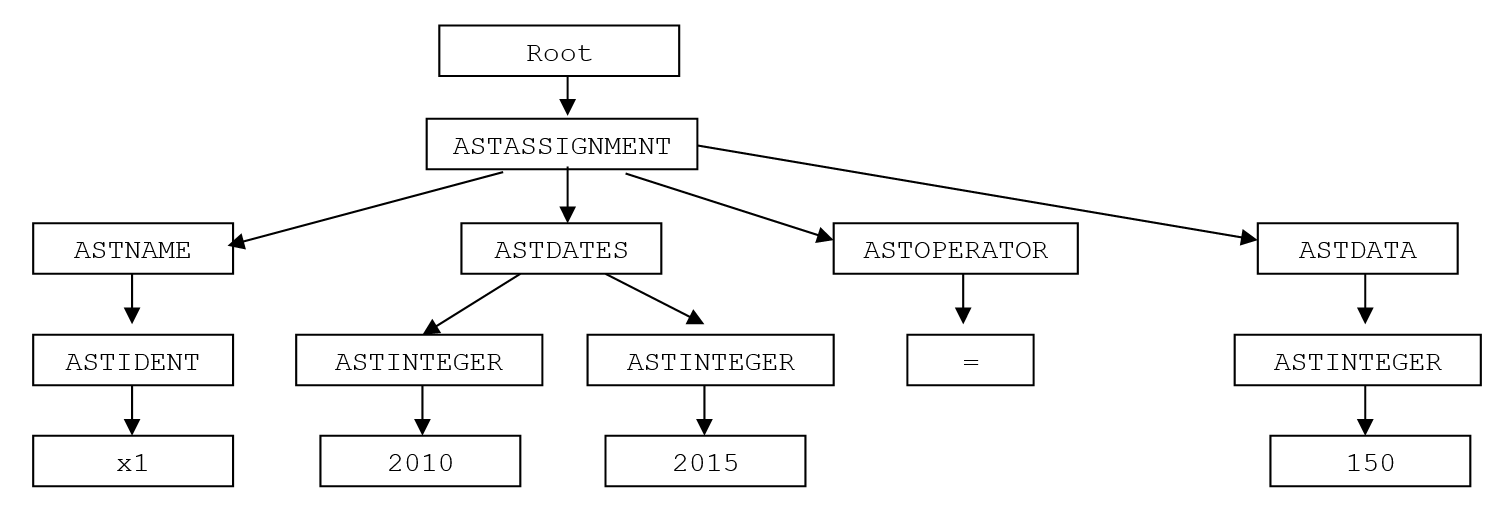
If we compare this tree with the output of the tokenizer shown in the table in the preceding section, we recognize some of the same tokens in the above tree (x1, 2010, 2015, =, 150), but here, these tokens are part of a larger structure, and not just a one-dimensional list of tokens. (We also see that some of the tokens are omitted in the tree, for instance <, > or ;. These tokens/symbols are used in the command file, but after being interpreted they are superfluous and would just add noise to the AST tree).
From the above structure it is for example evident that the two tokens 2010 and 2015 are intimately linked together, as they are children (or rather grandchildren) of the same (grand)parent node, ASTDATES. So the the tree tells us that 2010 and 2015 are to be interpreted as dates in a time period consisting of two dates.
Conclusion
To conclude this section, using a real parser for command files (and model files) entails a lot of advantages, since the command files gets transformed into a tree structure (AST tree) containing all the information in a way that makes it quite easy to transform that tree into corresponding C# code. This C# code can be compiled and executed, with the speed advantages this entails, and with the possibility of leveraging C# and .NET to take care of function and subroutine call stacks, loops etc. After translation and compilation, this particular piece of emitted code will run with the same speed as any other other C# code.