|
<< Click to Display Table of Contents >> Loops |
  
|
|
<< Click to Display Table of Contents >> Loops |
|
Note: If you are running one of the examples interactively in the Gekko input window, you should mark the code from for to the corresponding end, followed by [Enter]. Executing a FOR loop line by line in the Gekko input window will not work.
Also, beware that you may often use implicit looping over lists, as shown in the next section. |
Loops are used when the same statements or calculations reused over several variables. Loops can simplify and reduce the length of program files considerably. In Gekko, the FOR statement is used for looping, and lists are often used in combination with loops.
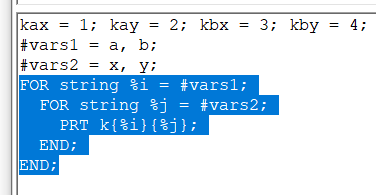
Example with lists:
kax = 1; kay = 2; kbx = 3; kby = 4; |
This will print the timeseries kax, kay, kbx, kby, one by one. In this particular case, the user could just use prt x{#i}{#j};, and Gekko would auto-unfold and print the same timeseries (cf. the section on array-series), but for many other purposes, fine-grained looping can be practical. You may also obtain roughly the same output with prt {'k*'};, but the difference is that the wildcard version includes all variables starting with 'k', possibly including irrelevant variables.
When using a FOR loop, the type of the loop variable must always be stated (the same is the case for function and procedure definitions), and a FOR loop must always end with a matching END statement.
FOR loops can also be used for date and value variables. Regarding these types, intervals are often used (and the by keyword can be used for step length), for instance:
%v1 = 1; |
Lists may also contain values or dates, and such lists may be looped in the same way as the first example (looping over a list of strings). Synchronized/parallel loops are possible, too, for instance:
#i = a, b; |
The sum() function over lists is practical for repetitive sums like p1*fx1 + p1*fx2 + p3*fx3 and similar. Such sums are often used for array-series, too.