|
<< Click to Display Table of Contents >> Databanks |
  
|
|
<< Click to Display Table of Contents >> Databanks |
|
The data management capabilities of Gekko has a lot to do with databanks. Databanks store Gekko variables, for instance timeseries, lists or scalar variables. The databanks can be read and written as external .gbk databank files, which is Gekko's own open databank format. When read into Gekko, databanks are in-memory, bounded in size only by available RAM. Databanks can contain a large number of variable names, so beware that the keys [Tab] or [Ctrl+Space] offer autocompletion on timeseries names (cf. here).
Hierarchical databanks list
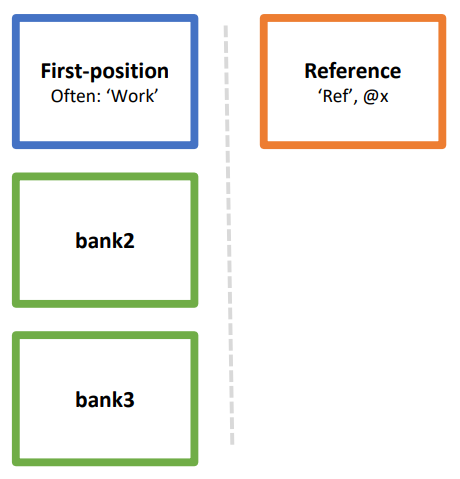
As seen on the left side of the illustration above, Gekko operates with the concept of a hierarchical list of open databanks. When Gekko starts up, only an empty Work databank is present in the first position in the databank hierarchy, providing a kind of working area. Besides Work, you may load other databanks to the databank hierarchy with the OPEN statement. The databanks are hierarchical in the sense that when issuing a statement like prt x;, Gekko will first look for the variable x in the first-position databank, then in the second-position databank (bank2 above), then in bank3, and so on.
If you need to, you may specify a databank name explicitly with colon :, like for instance prt bank2:x;. In that case, x is searched for only in bank2. Left-hand side variables like y in y = 2 * x; are always taken from the first-position databank, unless a databank name is provided explicitly (like for instance bank2:y = 2 * x;). There are options to control whether Gekko searches the databank hierarchy for a variable like x or not.
Gekko also operates with the concept of a reference databank (called Ref). This databank is often used for comparisons, for instance in modeling, but in data management programs the existence of Ref can be safely ignored. And rest assured, in a statement like prt x; or y = 2 * x;, Gekko will never search the Ref databank for the x variable. To access a variable from Ref directly, you may use for instance prt ref:x; or prt @x;, where the @ operator is short-hand for ref:.
As mentioned, when Gekko starts up, the Work databank can be thought of as the 'working area' in which timeseries and other variable types are stored per default. The Work databank can be filled with data via for instance the READ statement (reading an external Gekko databank .gbk file), or alternatively with IMPORT (obtaining data from different supported formats, for instance .csv, .xslx, etc.). If you subsequently want to save the variables of the Work databank, you must either save it as a Gekko .gbk databank file with WRITE, or export all the variables to a format that the EXPORT statement supports.
As an alternative to writing a databank with WRITE, you may use OPEN<edit> to open a databank .gbk file as editable in the first position in the databank hierarchy. After this, you may define and alter variables in that databank, and when you CLOSE the databank again, all changes to it are automatically written back to the same .gbk file.
Whether you use READ and WRITE, or alternatively OPEN and CLOSE to change the contents of a Gekko databank file is basically a matter of taste: data management programs tend to use OPEN/CLOSE more, whereas modeling programs tend to use READ/WRITE more. One thing to note about READ is that it first removes any variables already existing in the first-position databank, including helper variables you may have set previously, for instance time periods, file paths, etc. So when using READ, such variables should instead be put into the so-called Global databank, more on this at the end of this page.
Some relevant databank statements:
OPEN |
Opens a .gbk databank as read-only, in the last position in the list of open databanks. |
OPEN <edit> |
Opens a .gbk databank as editable in the first position in the list of open databanks. If the corresponding .gbk file does not exist, it will be created. |
LOCK/UNLOCK |
Can be used to set a databanks as read-only (LOCK) or editable (UNLOCK). Often open<edit> is sufficient, and note that a normal OPEN statement without <edit> option always opens a databank as read-only. |
CLEAR |
CLEAR clears a particular databank (deletes the contents). If no bankname is given, the first-position databank is cleared. |
CLOSE * |
Closes all open databanks (except Work) in the databank hierarchy, and saves all 'named' databanks to files, if these have been changed. Databanks can also be closed individually. The Work databank cannot be closed because it serves as a kind of 'working environment'. |
RESET/RESTART |
RESET implicitly performs a close *; (cf. above), and subsequently deletes and restores everything in Gekko, as if the Gekko main window had been closed and opened up again. With RESTART, user-defined options etc. can be reloaded. |
Gekko's own file format .gbk is the default format and used for READ/WRITE/OPEN/CLOSE, but as mentioned, Gekko can handle a number of other file types, which is described in the user guide section on import and export.
We will start out creating two databanks from scratch for later use. You do not need to understand the following code, just run it to create a couple of Gekko databanks for later use.
reset; |
The following example shows how to open up databanks:
reset; //resets everything |
When Gekko starts up, or when reset or restarted, there is only one databank in the databank hierarchy: the empty Work databank. The second statement above opens up the file bank.gbk in the first position in the databank hierarchy (note that bank is also cleared, to erase any data that might be already stored, if bank.gbk already exists). Opening bank in the first position demotes Work to the second place in the hierarchy. Subsequently, two more databanks are opened with the normal OPEN statement, which puts databanks at the end of the databank hierarchy (as read-only). In the third statement above, bank1.gbk is put into the third position, with the alias name b1. Finally, bank2.gbk is put into the fourth position, with the alias name b2. In the Gekko window, you can hit the F2 button to see the databank hierarchy, which will show the following (you can ignore the Ref databank):
Priority |
Name |
Filename |
1. |
bank |
bank.gbk |
2. |
Work |
|
3. |
b1 |
bank1.gbk |
4. |
b2 |
bank2.gbk |
As mentioned above, you can always refer to a variable from a specific databank using a colon : like this:
open bank1 as b1; |
In this example, the values of the timeseries x1 in each of the two databanks, together with the difference between the values are printed. The <n> option ensures that only levels are printed (no percentage growth rates).
So to sum up: An open<edit> will open that databank at the top of the databank hierarchy list (and in this case demote Work to second position), whereas a normal OPEN opens the databank at the bottom of the databank hierarchy.
The HDG statement allows you to include meta-information about a databank which will be shown when it is read or opened later on. For instance:
open <edit> bank1; |
This yields the following when the bank is read or opened:
-------------------------------------------------------------------------------
| DATABANK bank1 |
-------------------------------------------------------------------------------
| Info : Historical databank, period = 2010-2020 |
| Date : 08-02-2021 09:40:28 |
| File : c:\gekko\testing\bank1.gbk (vers: 1.2) |
| Period : The file contains data from 2010-2020 |
| Size : Read 2 variables from file into cleared Work databank (0.46 sec) |
| Note : Press F2 for info on databanks |
-------------------------------------------------------------------------------
The contents of a databank can be erased with the CLEAR statement:
clear bank1; |
If you need to clear the contents of the first-position databank, you can instead just use this:
clear; |
You may also close any open databanks with close *;. The following code cleans up databanks:
closeall; //same as close *; clear; --> will clear the Work databank |
Here, it should be noted that the Work databank can never be opened or closed, since it is to be understood as a kind of 'working area' always present. The two statements above will in general provide a 'cleaned up' working environment, closing all banks besides Work, and also deleting all variables already in Work. But some things live on in Gekko after a closeall;, for instance options, loaded models, functions and procedures, and other things. To also clear these things, you must use RESET or RESTART (or close and reopen Gekko).
The Global databank
As mentioned above, READ and WRITE are often used in modeling scenarios, whereas OPEN and CLOSE are often used for data management purposes. Still, READ and WRITE can advantageously be used for data management too, and may sometimes be more practical to use than a hierarchy of open databanks. As mentioned, this is a matter of taste, but if you plan to use READ and WRITE, beware that READ reads an external .gbk databank file into the first-position databank (typically the Work databank), after first clearing its contents.
For instance:
reset; |
Here, we start out defining an index year %ti, which we plan to user subsequently (%ti is a scalar, more on scalars later on). However, any variables you may have already defined in the first-position databank will be deleted after issuing a READ, and therefore the last statement fails, because it cannot find %ti. You may use read<merge> to avoid %ti being deleted, but then the first-position databank is 'polluted' with %ti, which you may not want to be included in the .gbk databank file, when you WRITE later on in your program.
Instead of this, you can put such helper variables into the so-called Global databank:
reset; |
Like the Work databank, the Global databank always starts out empty when starting up Gekko, and Global not be opened or closed. When looking for a variable, Global will be searched last for this variable, after all other databanks in the databank hierarchy have been searched. The variables in the Global databank both survive a read; and a closeall; (or close *; clear;), but Global is cleared after a RESET/RESTART.
An alternative to the above methodology is to use OPEN<edit> and CLOSE, for instance:
reset; |
With OPEN and CLOSE, it is easier to avoid that the databank gets 'polluted' with irrelevant helper variables, and this is perhaps the reason why OPEN and CLOSE is used a bit more than READ and WRITE for data management programs.
Data-traces
Data-traces are very useful for tracing why a particular timeseries has the values it has. Try to do the following (assuming the databank file bank1.gbk constructed above is still present):
time 2010 2020; |
This will show something like the following:
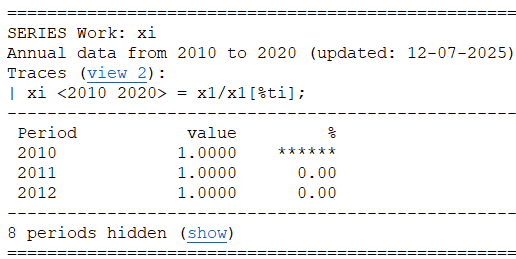
A trace xi <2010 2020> = x1/x1[%ti] is shown here, but if you click the view 2 link, you get the trace viewer:
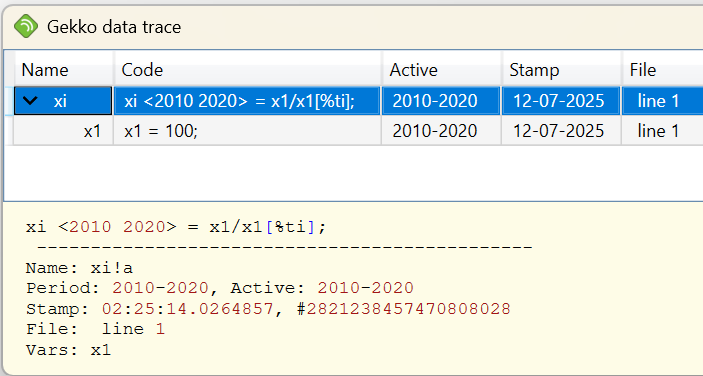
This example is particularly simple, but the trace viewer will in principle follow the timeseries (here: xi) back in time as long as necessary, in this case showing the definition of another timeseries, x1 = 100;. For larger data wrangling systems, data-tracing can save a lot of manual effort when timeseries values are not as expected and need to be understood. Data-tracing also works through Gekko databanks (.gbk files). It is a bit like "Trace Precedents" from Excel, just more powerful.